
Loyalty memberships and CSV enrollment
Manage who belongs to each tier from Loyalty → Tiers, customer tools, packs, CSV, or auto-enroll—when Loyalty is enabled.
How a membership works
Each customer has at most one membership per loyalty program.
| Concept | Meaning |
|---|---|
| Membership | Stable link: customer ↔ program (keeps history across periods) |
| Period | Current validity window (started_at → expires_at; blank expiry = open-ended) |
| Tier | Current level on the ladder (higher rank = higher tier) |
| Status | active (period in force), scheduled (starts in the future), expired / inactive |
Scheduled memberships (future started_at, e.g. ticket valid_from) can still receive pack reward grants; redeeming those benefits usually waits until the member is active.
Ways to enroll
| Source | Typical use | Downgrade allowed? |
|---|---|---|
| Pack (Catalog → Packs → Loyalty tier) | Check-in / Box Office / ticket apply | No — keeps higher tier |
| Dashboard / CSV / admin | Manual enroll, bulk import, customer tools | Yes — admin can move to a lower tier |
| Auto-enroll (program setting) | First wallet activity → base tier | Does not change an already-active tier |
Pack expiry for the membership (validity days / end date on the pack, or ticket line valid_to) is separate from pack entitlement expiry (credits/accesses).
Validity (how long the period lasts)
When starting or extending a period, Opera picks an end date in this order:
- Pack Membership end date and/or Membership validity (days) if set on the pack
- Else ticket/order line
valid_towhen the pack came from a catalog order - Else program defaults (rolling days and/or season end)
- Else no expiry (open-ended)
If both a fixed end date and rolling days are set, the earlier of the two wins.
Collisions: pack or enrollment vs existing membership
When someone is already a member and another enroll happens (another pack, CSV row, admin enroll), Opera resolves by tier rank and source.
Summary matrix
| Current state | Incoming enroll | Result | Validity / period |
|---|---|---|---|
| No membership / expired | Any tier | Enrolled or re-enrolled | New period with resolved expiry |
| Active, same tier | Same tier again (e.g. second same pack) | Extended | Current period ended; new period starts now with new expiry |
| Active, lower tier | Higher-rank tier | Upgraded | Tier changes on the same period — expiry is not reset by the upgrade |
| Active, higher tier | Lower-rank tier via pack | Kept higher | No tier change, no period change |
| Active, higher tier | Lower-rank via admin/CSV | Downgraded | Tier changes on the same period — expiry unchanged |
| Active | Auto-enroll base tier | No change | Active members are left alone |
Upgrade (Silver → Gold)
Example: guest is Silver; a Gold pack is applied.
- Membership becomes Gold.
- Current membership period (and its end date) continues.
- Pack validity days / end date do not replace the existing period end on upgrade.
- Tier-upgrade rules/rewards may fire (subject to caps such as once per customer).
- Pack-bundled loyalty rewards on that pack are still issued when the membership is grantable.
To give Gold and a longer membership window, use a same-tier Gold pack again after upgrade (extension), or set a longer period via admin / a dedicated extension pack at the same tier.
Downgrade (Gold → Silver)
| Channel | Behavior |
|---|---|
| Pack | Ignored for tier — guest stays Gold (kept_higher). Pack credits/accesses and pack loyalty rewards can still apply. |
| Admin / CSV | Allowed — guest becomes Silver on the same period (expiry unchanged). |
Validity extension (same tier again)
Example: guest is already Gold until 1 June; another Gold pack (or admin enroll to Gold) is applied with 30 validity days.
- Outcome: extended.
- Previous period is closed; a new period starts at application time.
- New
expires_atcomes from the pack / ticket / program rules above (e.g. now + 30 days).
This is the supported way to renew or lengthen membership without changing tier.
Pack without a tier (rewards only)
A pack can grant loyalty rewards without selecting a tier. If the guest has no grantable membership, side effects that need a member may be skipped; prefer attaching a tier (or ensure they are already members) when bundling rewards.
Enroll from the UI
- Open your event in Dashboard.
- Open Loyalty → Tiers (or the customer loyalty tools).
- Select the tier and enroll the customer or tag.
You can also bulk-enroll from the Customers area when Loyalty is on for the event. Admin enrollments may downgrade.
CSV enrollment (per tier)
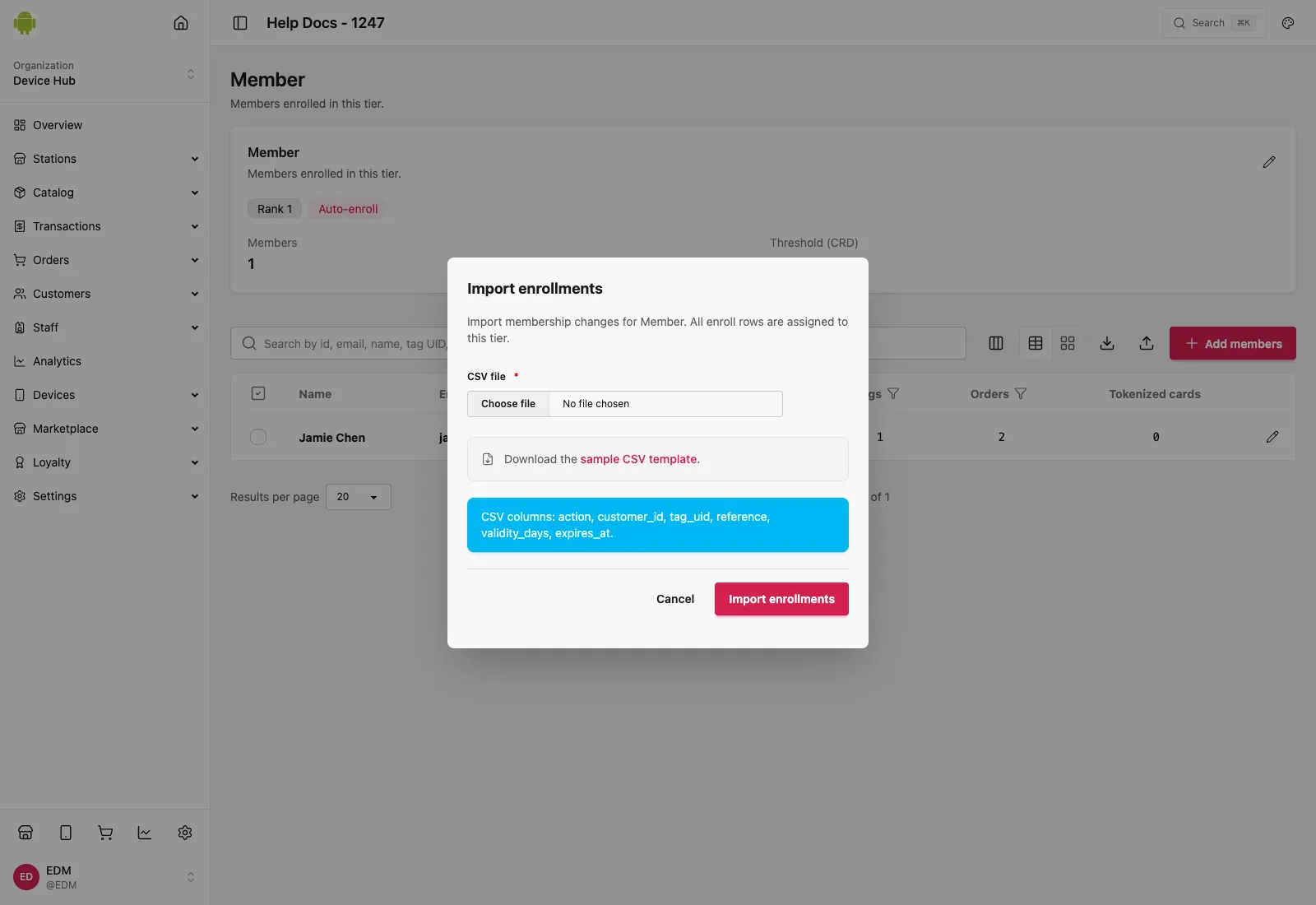
Prepare a UTF-8 CSV with these headers:
| Column | Description |
|---|---|
action | enroll or end |
customer_id | Customer id when known |
tag_uid | Tag UID to enroll |
reference | Alternate reference when used |
validity_days | Optional membership length in days |
expires_at | Optional explicit expiry |
- Open the tier’s enrollment / import action in Dashboard.
- Upload the CSV.
- Review results for skipped, upgraded, downgraded, or extended rows.
CSV enroll into a tier uses the same collision rules as admin (downgrade allowed). Ending (action=end) closes the active membership period.
Ending membership
Ending a membership (UI, CSV end, or admin) closes the current period. Benefits that depend on an active member stop; historical periods and tier assignments remain for support and reporting.