
Packs
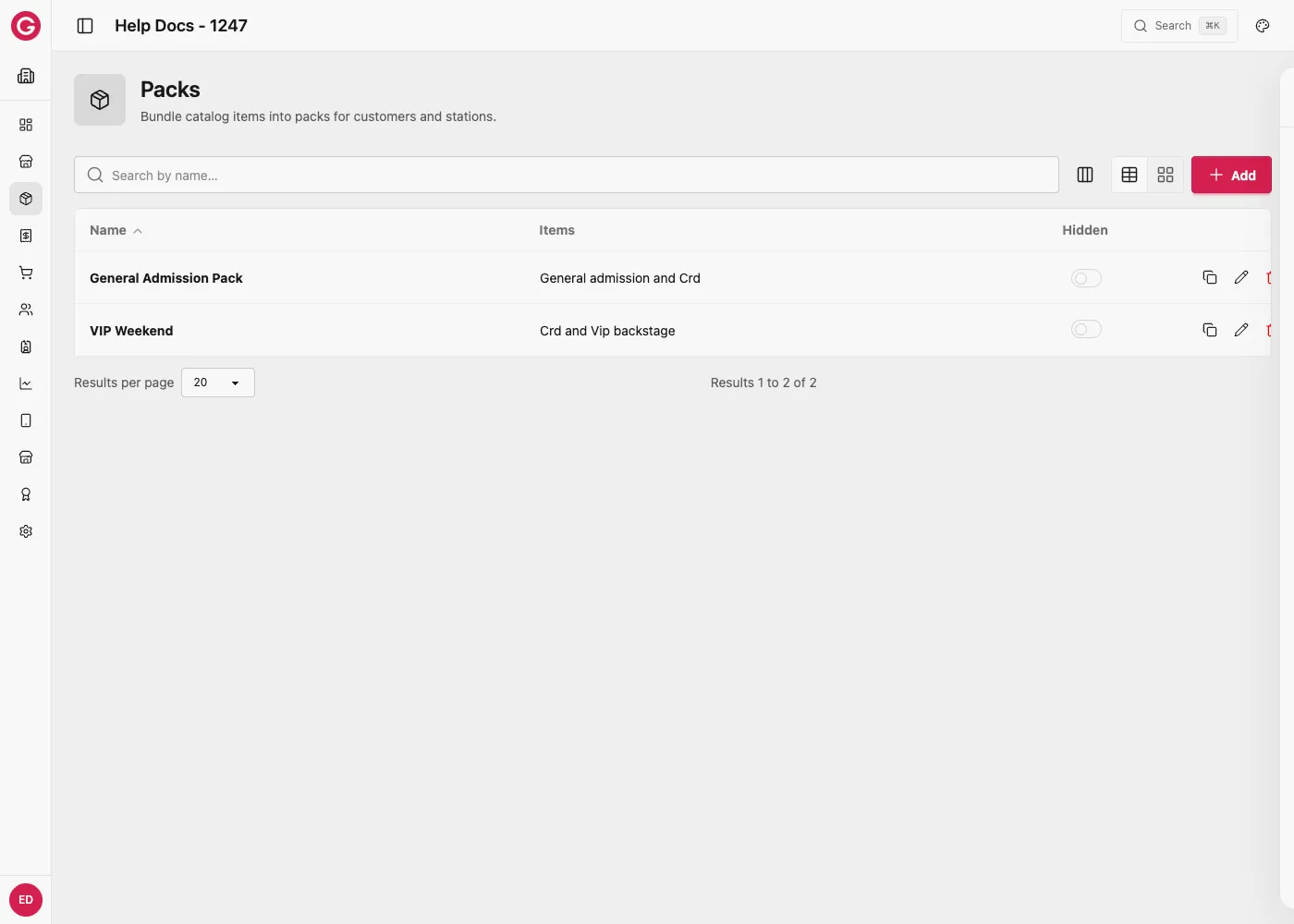
Packs group entitlements applied to customers or staff. In Dashboard: Catalog → Packs.
What a pack can include
| Item | Description |
|---|---|
| Credits / Virtual credits / Tokens | Balances from Currencies |
| Access types | Access entitlements |
| Operator permissions | Staff station permissions |
| Flags | e.g. Alcohol Forbidden, Initial Top-Up Fee Paid |
| Loyalty tier | Enroll the customer in a Loyalty tier when the pack is applied (Loyalty module on) |
| Loyalty rewards | Grant copies of catalog rewards with the pack (in addition to credits/accesses) |
How packs are applied
- At Check-in on pre-purchased tickets
- Sold at Box Office (prices can differ by station)
- Applied to Staff
Open packs
- Open Dashboard and select your event.
- Go to Catalog → Packs.
- Create or edit a pack, configure expiry / loyalty / items, save.
Pack expiry settings
Under Pack expiry settings, control when pack entitlements expire. Use either a fixed date/time or relative offsets—not both (the form rejects mixing them).
| Field | Use when |
|---|---|
| Expiry date | Fixed calendar end date for the pack |
| Expiry time | Time of day (alone or with expiry date)—do not mix with hour/minute offsets |
| Days / months / years offset | Relative lifetime from when the pack is applied (e.g. 3 days after check-in) |
| Hours / minutes offset | Shorter relative windows (do not mix with absolute expiry time) |
Leave expiry blank for no pack-level expiry (individual catalog items may still have their own rules).
Time-of-day only (rolls to next day if already past)
On Touch, setting only Expiry time (no expiry date and no day/month/year offsets) means “expire at this clock time.”
If that time has already passed today, Touch schedules expiry for the next day at that time.
| Applied at | Expiry time set | Resulting expiry |
|---|---|---|
| Today 14:00 | 01:00 | Tomorrow 01:00 |
| Today 00:30 | 01:00 | Today 01:00 |
Use this when you want “valid until 1am” overnight windows without picking a calendar date. If you also set day/month/year offsets, those offsets apply and Touch does not add the automatic +1 day.
Loyalty (when Loyalty is enabled)
If Settings → Modules → Loyalty is on and a program exists, the pack form shows a Loyalty section.
| Field | Description |
|---|---|
| Loyalty tier | Optional. When the pack is applied, enroll (or move) the customer into this tier. Selecting a tier or reward also includes the loyalty member flag so the pack can be sold as a loyalty-only pack on Touch 10.4+. |
| Membership validity (days) | Optional rolling membership length from enrollment. Leave blank to use the program default (or lifetime / season end rules). |
| Membership end date | Optional fixed membership end (e.g. season close). Pack loyalty expiry fields win over ticket line validity when set. |
| Loyalty rewards | Add one or more rewards with a grant quantity (how many copies to issue when the pack is applied). |
If the guest is already a member
Pack enrollment never downgrades. Full collision rules: Membership lifecycle.
| Already | This pack’s tier | What happens |
|---|---|---|
| Lower tier | Higher | Upgrade — tier rises; membership end date stays on the current period |
| Same tier | Same | Extend — new period with pack/program validity |
| Higher tier | Lower | Keep higher — tier unchanged; pack credits/rewards can still apply |
| Expired / none | Any | Enroll with pack validity |
Clone copies pack items, expiry settings, and bundled loyalty rewards (tier remains on the clone).
User flags
- Alcohol forbidden — yellow-card style restriction on alcoholic products.
- Initial top-up fee paid — skips a configured initial top-up fee (often prepaid with the ticket).
Pack items
Add any number of catalog entitlements (credits, tokens, accesses, operator permissions). Amounts are set per row.
Worked example: a “VIP Weekend” check-in pack
A festival sells a VIP ticket that should give guests a credit top-up, unlimited ride access, and VIP loyalty status the moment they check in, all from one pack.
- Create a pack called VIP Weekend.
- Under Pack items, add
50Credits so the guest’s wallet is pre-loaded on arrival. - Add the VIP backstage access type with behaviour Permanent strict, so the guest can pass backstage gates all weekend.
- If Loyalty is enabled, set Loyalty tier to VIP so check-in also enrolls the guest in the matching loyalty tier.
- Leave Pack expiry settings blank so the credits and access last the whole event.
- Save, then attach the pack to the VIP ticket type so it is applied automatically at Check-in.
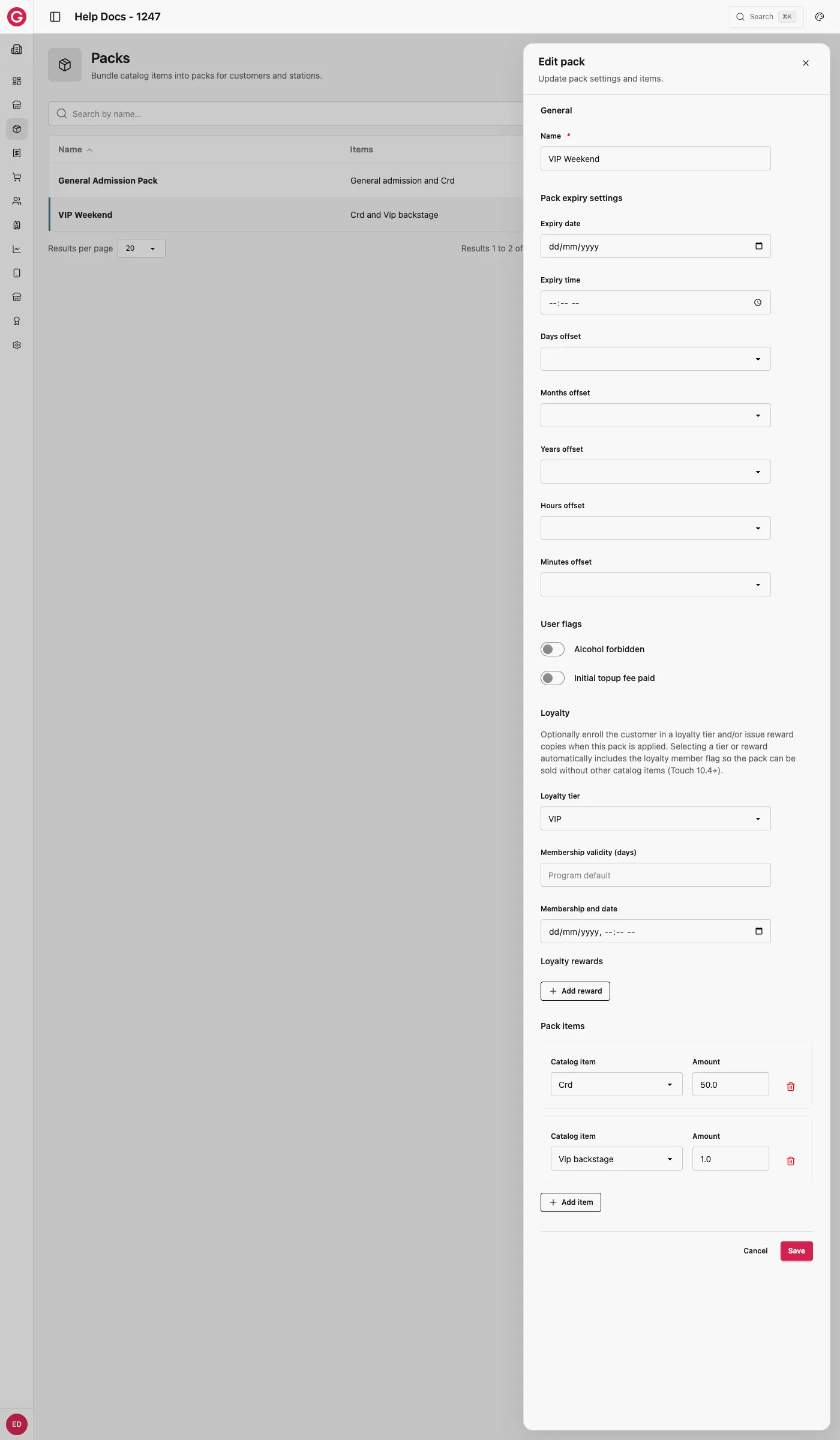
When a VIP guest checks in, their wristband is issued the 50 credit top-up and backstage access in one action, and if Loyalty is on, they are already a VIP tier member before they make their first purchase, qualifying immediately for any VIP-only rewards configured on that tier.